

Don’t Skip This Track
Cantata Strikes a New Chord for Plasma 6
The Landscape of Qt/KDE Music Players
Cantata is a music player for all platforms but before diving into this audio software, it’s worth understanding the ecosystem in which it truly shines – QT. Notably KDE Plasma, which has a legacy of feature-rich music applications. The legendary Amarok originally set a high bar with its innovative UI and deep integration, and it too notably has been recently reborn with new releases. The Qt framework has enabled a diverse array of players, from the lightweight Qmmp to the cross-platform Clementine and including its spiritual successor Strawberry.
This environment values extensive configurability, and tight desktop integration—qualities that Cantata would come to embody. There is the newer KDE Elisa which provides a modern, straightforward experience, though it is often criticized for its lack of features and functionality compared to its more mature counterparts.
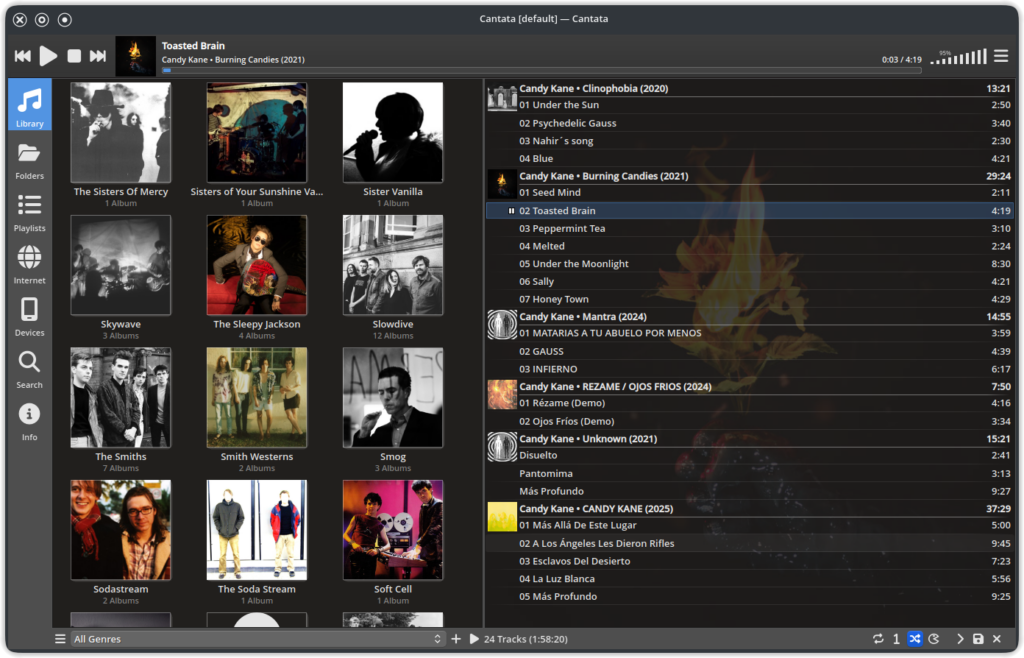
One underappreciated champion within this pantheon of Qt music players is Cantata. A very tidy-looking music player, it is nonetheless packed full of features and configuration options while still looking ‘fresh’ over time. Whereas many music players are hard-coded in their design, Cantata, with its Qt base, allows the user’s choice of desktop theme to shine through the interface.
Cantata’s Origins: From a Frustrated Fork to a Feature Powerhouse
Cantata began in 2011 when KDE developer Craig Drummond, seeking a remote-controllable music setup, turned to MPD – Music Player Daemon. Finding the available Qt client, QtMPC, abandoned and flawed, he forked it. The project quickly grew from fixing UI quirks to a major rewrite, incorporating KDE libraries for a polished look. It evolved organically, adding features like AudioCD support, radio stations and even a simple podcast library.
A New remix: Cantata for Plasma 6
While Craig Drummond moved on from Cantata around 2018, placing it in a bug-fix-only state the story didn’t end there. (During this limbo period it could be argued that the KDE community may have benefited in adopting it rather than placing effort into developing Elisa). The open-source community nonetheless kept the flame alive and its independence from any Linux organisation may very well be a benefit.
Recognizing the need for a modern version compatible with the latest Plasma 6 and Qt 6 frameworks, developer Nullobsi picked up the torch. This new iteration ensures Cantata remains a viable and polished option for users on the cutting edge of the KDE desktop, with the latest version (v3.4.0) being released in December 2025.
Who Is Cantata For?
Cantata is the ideal choice for the user who embraces the MPD philosophy of a server-client architecture. If you want a central music repository that can be controlled from multiple devices on your network, Cantata provides one of the most elegant and powerful frontends available. For local playback a user can install MPD on the same machine and choose ‘Single Mode’ at the initialisation stage.
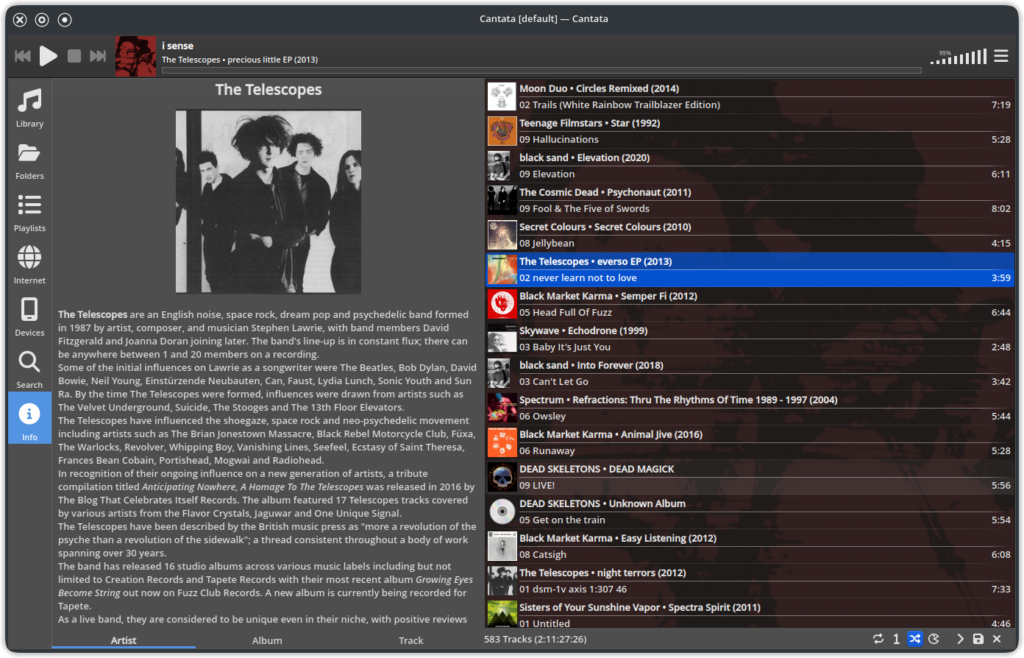
It’s for the listener who appreciates a clean, configurable interface and values features like seamless cover art fetching. One stand-out feature is the option to turn on cover art to be displayed in full behind the playlist. Too many music players ignore this visualisation having no cover art or displaying it in a such a small format as to be of negligible status. In Cantata is can be given large ‘Vinyl record’ prominence. Even then this can blurred in the settings to mute its domination if desired.
Another stand-out feature is Artist view. While many players offer album cover view, Cantata also offers the option of Artist image view in its configuration. It can pull in a picture of a band or the user can add their own.
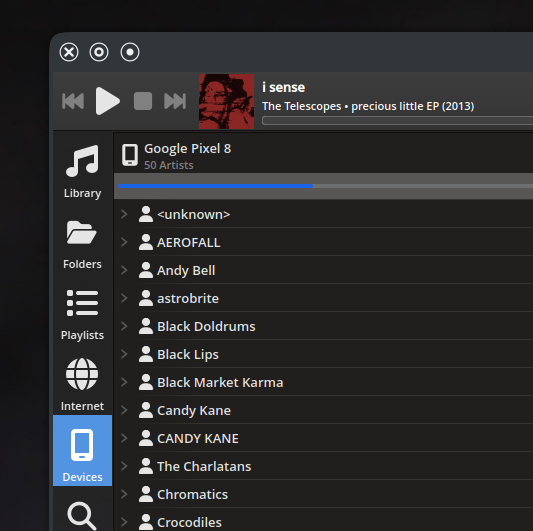
Although arguably the use of KDE Connect is a quicker way to transfer music to a mobile phone, Cantata also has the option to connect a phone via cable to populate the its library in the Cantata interface so as to enable transfer of music.
Cantata is also for the user who wants desktop integration. Cantata’s MPRISv2 D-Bus interface enables system-wide controls, allowing one to use the keyboard’s media keys, KDE desktop widgets, and lock screen controls to manage Cantata. Pop-up for song changes can be enabled so the listener can be informed of the track while using other programs.
Cantata’s legacy as a meticulously crafted, powerful, and beautiful MPD client is undeniable. Thanks to the efforts of developers like Nullobsi, it continues to be a top-tier choice for audiophiles and KDE users who demand both form and function from their music player.
Find Cantata at https://github.com/nullobsi/cantata